Agentctl
Agentctl
Introduction
agentctl is a command-line tool using encrypted TCP protocol to perform active response. Notable features include:
- Always-On: Maintains working session and downloads files from Agent to local machine.
- WinPTY: SSH connection to Windows Agent.
- oneXar: Performs comprehensive active responses such as updating AR, blocking/unblocking IP, getting MD5, and killing ransomware.
Key Features
- SSH connection with Agent.
- List and check Agent status.
- Restart Agent.
- Perform Always-On: SSH into Windows and download files from Agent to local.
- Perform oneXar: Block/unblock IP, update AR, get MD5, check ESET antivirus information, kill ransomware.
Flow Diagram
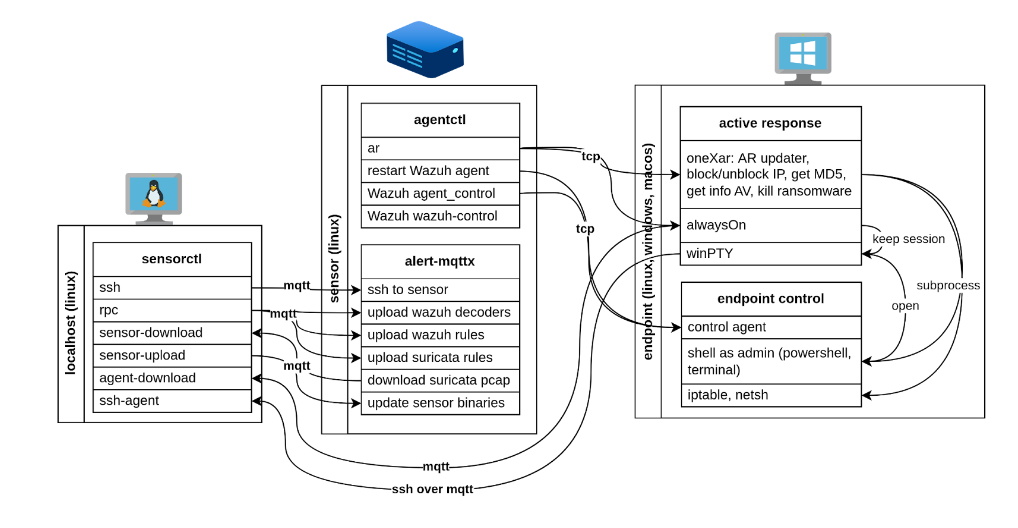
Main Features
- 05 main features:
agent,ar,wazuh-control,restart-manager,restart-agent. - 02 additional features:
ssh-agent,agent-download.
Use Case 1: Establish direct SSH connection to Agent
-
SSH to Sensor:
bash ./sensorctl ssh sensor-20250101000000.000 -
Find Agent ID on
soc-managerand enable active response Always-On on Agent:bash ./sensorctl ssh sensor-20250101000000.000 agentctl agent agentctl ar run --agent 001 --command "alwayson-windows0" -
Return to local machine and SSH to Agent through
sensorctl:bash ./sensorctl ssh-agent sensor-20250101000000.000 001
Use Case 2: Incident Response – Isolate Agent infected with malware
- SSH to Agent to get victim machine IP address through
sensorctl. -
Send isolation command for victim machine IP to all Agents:
bash
agentctl ar run --all-agents --command "onexar-windows0" --args "block-ip" --alert '{"data":{"ip":"192.168.121.2"}}'
Explanation
- The command above calls active response
oneXarwith IP blocking function (block-ip), applicable to all Agents. - IP address
192.168.121.2(ID 001) will be blocked by firewall on all machines with Agent installed (ID 001-005), isolating the infected machine in the system.
Use Case 3: Investigation – Get IOC from Agent
- SSH to Agent to get IOC of victim machine through
sensorctl. -
Download IOC from Agent to local machine:
bash ./sensorctl agent-download sensor-20250101000000.000 001 --dst_file "C:\Users\user\Pictures\minikatinat.exe" -
With hash
92804faaab2175dc501d73e814663058c78c0a042675a8937266357bcfb96c50, can determine this is themimikatz.exetool.