Offices
Offices
The Offices module manages offices, branches, or subunits in the system. Each office may have multiple agents collecting and sending cybersecurity data to the system, corresponding to 01 Sensor device.
Purpose
- Manage location, number of agents, and operational status for each Office.
Key Features
- Monitor operational status of each office.
- Check number of active/inactive agents at each location.
- Manage by geographic map (can display map view).
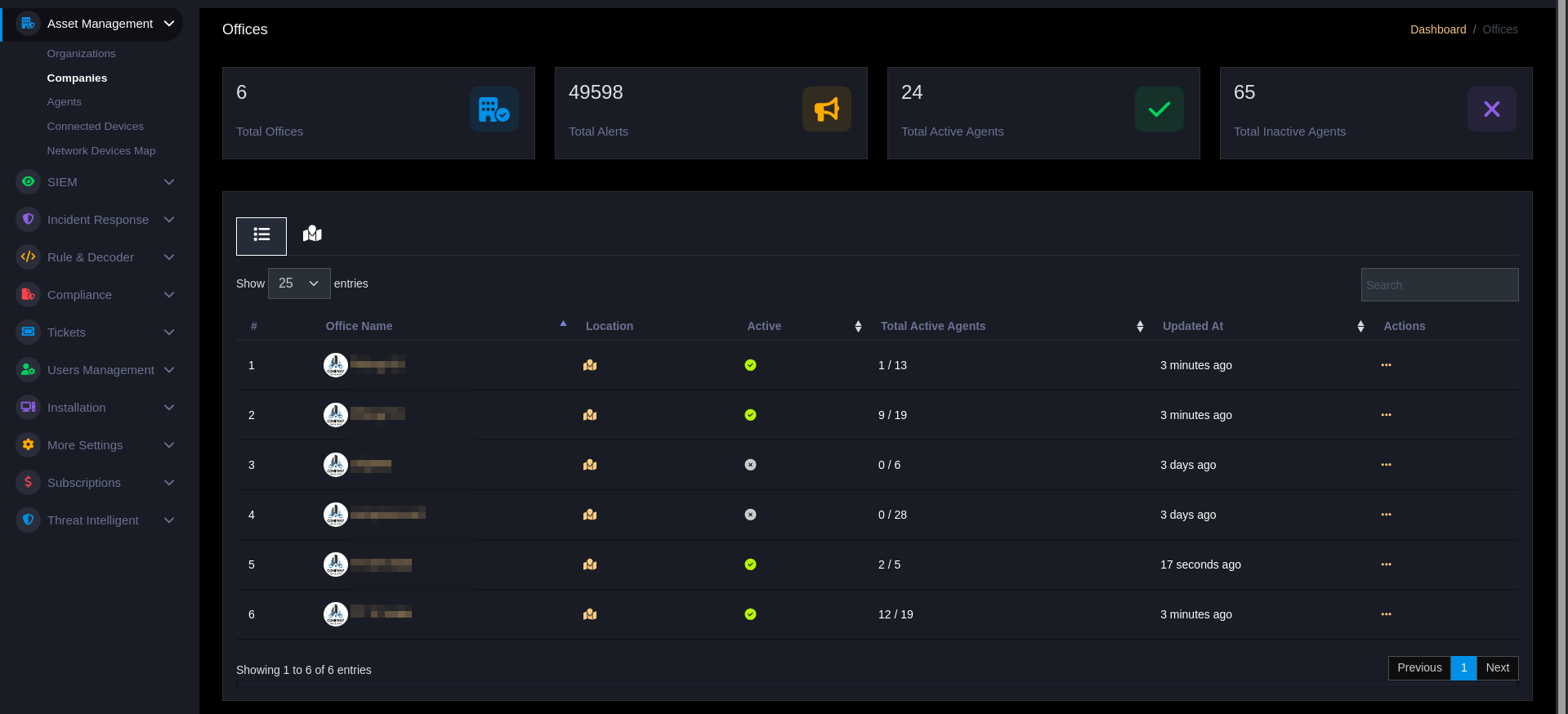
Dashboard
Displays key metrics
Total Offices: Total offices created in the systemTotal Alerts: Total security alerts from all officesTotal Active Agents: Number of agents sending data to the centerTotal Inactive Agents: Number of inactive or disconnected agents
Offices Table
| Column | Description |
|---|---|
| # | Number |
| Office Name | Office name (with logo) |
| Location | Location (map) |
| Active | Operational status |
| Total Active Agents | Number of active agents / total agents |
| Updated At | Last update time |
| Actions | View, Overview, Edit, Delete |
Tags & Filtering
- Assign tags to Office (e.g.,
production,hq,branch-vn) for easy filtering. - Filter Office by tag or name to quickly focus management.
Map Marker
- Select longitude/latitude by clicking on map or dragging the marker; the
longitude/latitudefields will be automatically updated.
Operations
- Use
Overviewto view agent and alert summary for each Office. - Use tags to create reports or prioritize alerts for important Offices.