Global CEL Rules
Global CEL Rules
Introduction to Common Expression Language (CEL)
CEL (Common Expression Language) is an expression language developed by Google, used to evaluate logical conditions flexibly, concisely, and efficiently.
CEL is commonly used in systems requiring dynamic rule processing, event filtering, condition checking, or behavior customization without recompiling source code.
Overall Structure of CEL Rule File
metadata:
  author: "Blue"
  email: "blue@team.com"

rules:
- uuid: "00000000-0000-0000-0000-000000000001"
    description: "Suspicious activities alerts and boost level to 13"
    filter_expr: "alert.rule.description.contains('suspicious activities')"
    transform_expr: "13.0"
    metadata:
    note: "Boost alerts to level 13"
    field: "rule.level"

- uuid: "00000000-0000-0000-0000-000000000004"
    description: "Drop agent event queue is flooded"
    filter_expr: "alert.rule.description.contains('Agent event queue is flooded')"
    transform_expr: ""
    metadata:
    note: "Drop agent event queue is flooded"
    action: "drop"
2.1 Metadata
metadata:
  author: "Blue"
  email: "blueteam@netnam.com"
Purpose: Provides describing information about the creator, making it easier to manage or share rules.
Common fields:
author: Name of writer or responsible team.email: Contact for support or bug reporting.
(This section does not affect processing logic, only for description.)
2.2 Rule
List of defined rules. Each rule has the following standard structure:
uuid: "<unique identifier>"
description: "<short description of rule purpose>"
filter_expr: "<CEL condition used to filter events>"
transform_expr: "<value or change action>"
metadata:
  note: "<additional note>"
  field: "<field name to change>"
  action: "<special action>"
Configuring CEL Rule on Portal
CEL rule is a set of logical conditions written in CEL, used to filter or trigger alerts based on event content.
Its strength is flexible structure, easy to change — you can adjust detection conditions without editing complex XML/rule files.
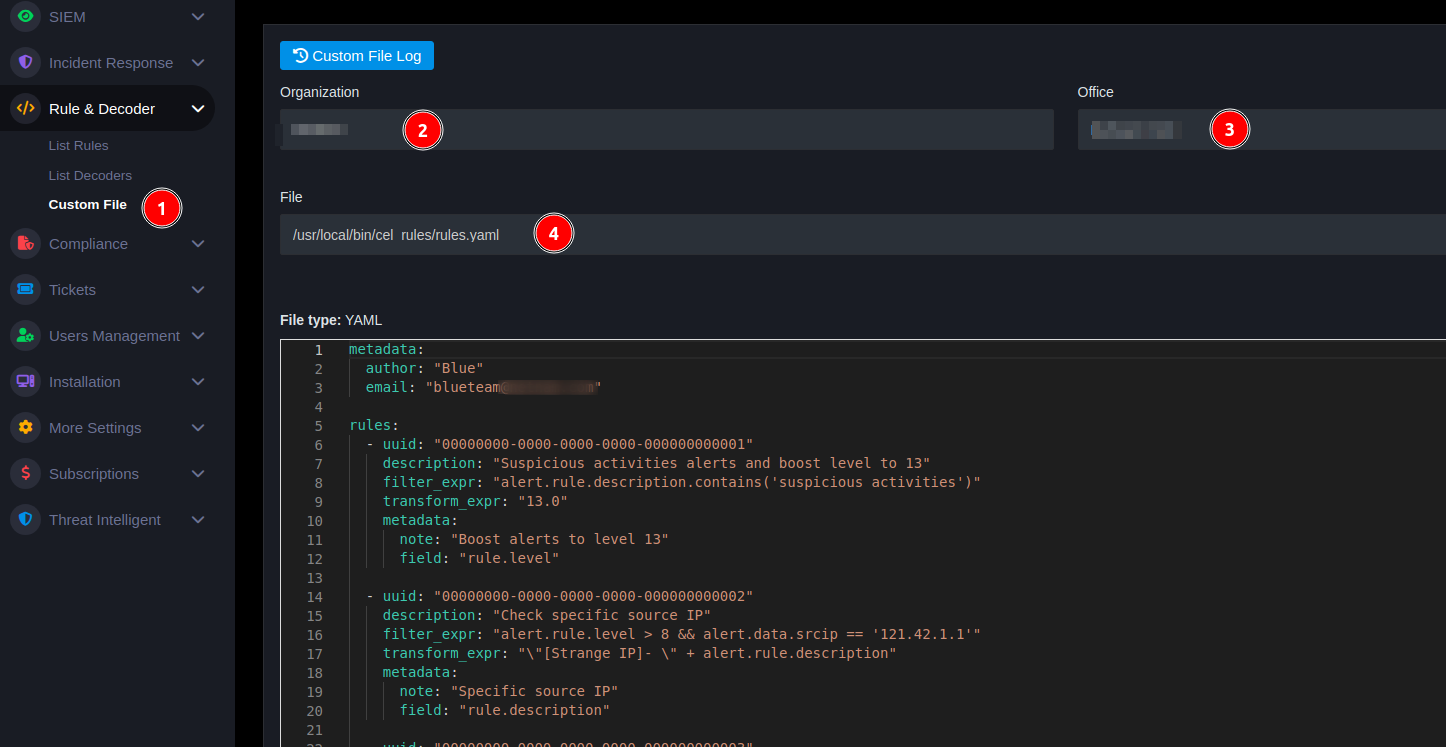
- Go to Rule & Decoder Menu
- Select Global Rules
- Edit rules according to actual needs
3.1 Example
Rule 1: Boost Alert Level
When event description contains "suspicious activities" → CEL rule will assign rule.level = 13.
rules:
  uuid: "00000000-0000-0000-0000-000000000001"
  description: "Suspicious activities alerts and boost level to 13"
  filter_expr: "alert.rule.description.contains('suspicious activities')"
  transform_expr: "13.0"
  metadata:
    note: "Boost alerts to level 13"
    field: "rule.level"
Rule 2: Skip Queue Flood Event
When event contains "Agent event queue is flooded" → CEL rule will drop (skip) the event, not send to alert.
uuid: "00000000-0000-0000-0000-000000000004"
description: "Drop agent event queue is flooded"
filter_expr: "alert.rule.description.contains('Agent event queue is flooded')"
transform_expr: ""
metadata:
  note: "Drop agent event queue is flooded"
  action: "drop"
Rule 3: Combine Multiple Events with OR || Logic
Suppose the case needs to "drop" alert "ET SHELLCODE Rothenburg Shellcode" below, not show on Portal:
You can see in the alert the "rule.description" field contains ET SHELLCODE Rothenburg Shellcode, so corresponding filter_expr is: alert.rule.description.contains('SHELLCODE Rothenburg Shellcode' (always need alert at the beginning)
Similarly, with alert "GPL SHELLCODE x86 0xEB0C NOOP"
Combine two rules using OR || operator. The rule below means drop if content contains GPL SHELLCODE or SHELLCODE Rothenburg.
Rule 4: Combine Multiple Events with AND && Logic
Can combine both && and || as the rule below. The rule below means when manager.name contains 20250825113021.292 AND targetFilename contains Google Chrome or Acrobat then drop alert.
Reference
https://github.com/google/cel-spec/blob/master/doc/langdef.md